
Instagram, a digital mosaic of moments, has evolved. Its ephemeral “Stories” captured transient joys, yet a need for permanence emerged. Users craved curated, lasting narratives. Thus, “Highlights” were born. They transformed fleeting content into enduring digital collections.
Highlights now adorn every profile, serving as curated showcases. These mini-albums define digital identities. They capture brand essence. For many, they are crucial, as they offer an instant glimpse and reveal who one is and what one cherishes. The very concept is profound.
This comprehensive guide explores the Instagram highlight viewer. We will dissect its intricacies and illuminate its functionalities. Moreover, we will address crucial privacy concerns. Can you see who views your Instagram highlights? This common query often arises. This article aims to clarify. It will equip you with knowledge. Welcome to the definitive 2026 manual.
The Anatomy of a Highlight: More Than Just a Story
Before delving into the Instagram highlight viewer, let us understand the highlight itself. A highlight is essentially a Story. It has been strategically saved. It is then organized into a permanent collection. These collections appear prominently. They sit just below your bio. They are above your main grid.
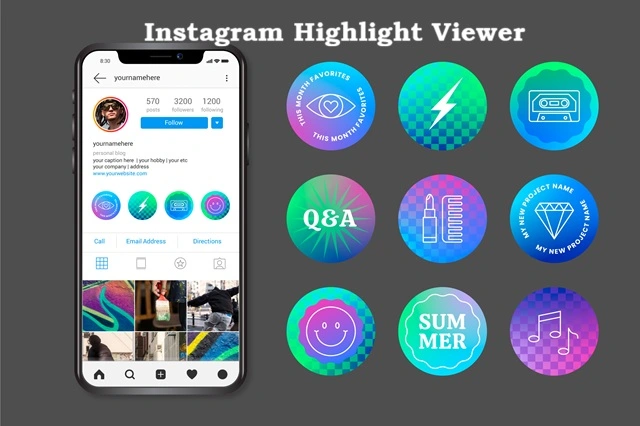
Each highlight possesses a cover image. It has a distinctive title. These elements are customizable. They reflect the highlight’s theme and enhance aesthetic appeal. Think of them as chapter headings. Each signals a unique narrative thread. They beckon exploration.
Highlights defy the 24-hour Story limit. They remain indefinitely. Unless, of course, you choose removal. This permanence is their core strength. It allows for strategic content curation. Brands use them effectively. Individuals craft personal archives. They tell a deeper story.
The Intricacies of the Instagram Highlight Viewer Explained
To understand the Instagram highlight viewer, one must grasp its interaction. When you tap a highlight, it unfurls. It displays the archived Stories sequentially. The experience mimics viewing live Stories. Each clip plays automatically. You can tap to advance, or swipe to skip. The interface is intuitive.
How View Counts Function:
- Initial Story Viewers: When a Story is live, you see viewers. Instagram provides this data. It is precise for 24 hours.
- Highlight Viewers After 48 Hours: This is where it changes. After the Story expires (24 hours), and then an additional 24-hour grace period, viewer data disappears.
- The Core Question: Can you see who views your highlights on Instagram after this period? The direct answer is no. Instagram does not provide this metric. This is a critical distinction.
This aspect often confuses users. They assume continuity. However, highlight viewing works differently. It prioritizes the content’s permanence and de-prioritizes individual viewer tracking. This design choice has implications. We will explore these fully.
The Burning Question: Can You See Who Views Your Instagram Highlights?
This query ranks among the most frequent. It generates much discussion. Let’s provide a clear, definitive answer. This will settle all doubts.
Directly, no. Instagram does not permit this. You cannot see specific individuals. They view your Highlights. This applies after the initial 48-hour window. Remember this crucial timeframe.
The Nuance Explained:
- Live Story Phase (0-24 hours): While your Story is active, you see precise viewer names. Swipe up on your Story. A list appears. This is clear.
- Grace Period (24-48 hours): Even after a Story expires, for another 24 hours, viewer data persists. You can still check this. Access the archived Story.
- Highlight Phase (48+ hours): Once this 48-hour window closes, viewer information vanishes. Instagram purges this data. It is no longer accessible.
Therefore, if someone views a highlight:
- From a Story within the 48-hour window: Yes, you see their name.
- From a Story after the 48-hour window: No, you do not.
This distinction is vital. It shapes privacy expectations. It influences strategic choices. Do not fall for false claims.
Debunking Myths: Understanding Instagram’s Privacy Protocol
The internet abounds with misinformation, especially concerning social media features. Let’s dispel common myths. These relate to the Instagram highlight viewer.
Myth 1: Third-Party Apps Reveal Viewers.
- Reality: Be extremely cautious. Such apps are often scams. They compromise your account security. Instagram’s API restricts this data. No legitimate app can bypass it. Protect your credentials always.
Myth 2: Changing Highlight Cover Photo Resets the Viewer List.
- Reality: This is false. The viewer data simply expires. It is not “reset” by actions. The 48-hour rule remains absolute.
Myth 3: Instagram Will Change This Policy Soon.
- Reality: Instagram has maintained this policy. It has been consistent for years. There is no indication of change. This protects user privacy. It simplifies data management.
Myth 4: A “Ghost Viewer” Exists.
- Reality: This is pure fiction. There is no hidden mechanism. No anonymous viewer log. Instagram is transparent here.
Understanding these realities empowers you. It protects you from scams and sets accurate expectations. Can people see if you view their highlights on Instagram? This is another facet of privacy. We will address this directly.
The Flip Side: Can People See if You View Their Highlights on Instagram?
This is the corollary to our main query. What about your privacy? When you engage with others’ content?
- Your Identity Remains Secret (Generally): If you view a highlight containing an expired Story (over 48 hours old), your view is anonymous. The creator cannot see you. This provides viewing freedom.
- Your Identity is Visible (Briefly): If you view a highlight containing a Story within its 48-hour window, your name appears. It registers as a view, just like a live Story.
So, when you consider it, can people see when you view their Instagram highlights? The answer hinges on timing. The same 48-hour rule applies. This ensures consistency. It protects both parties and offers a clear framework.
This symmetrical approach is by design. It balances content longevity and protects individual viewing privacy. This dual benefit is powerful.
Strategic Uses for the Instagram Highlight Viewer
Beyond basic functionality, the Instagram highlight viewer offers strategic advantages. Both for personal brands and for businesses alike. Harnessing its full potential is key.
1. Personal Branding and Identity:
- Curated Persona: Highlights tell your story. They showcase passions and highlight achievements. Build a compelling narrative.
- Skill Showcase: Artists display portfolios. Musicians share performances. Writers reveal creative processes. It’s a living resume.
- Life Milestones: Document travels. Celebrate events. Archive precious memories forever. These are personal treasures.
2. Business and Marketing Leverage:
- Product Showcases: Display new arrivals, detailed features. Showcase customer reviews. It’s a visual catalog.
- Behind-the-Scenes: Humanize your brand. Share office culture. Introduce team members. Build an authentic connection.
- FAQs and Tutorials: Address common questions. Provide how-to guides. Simplify user education. Reduce customer service load.
- Testimonials: Compile positive feedback. Build trust and credibility. Social proof is powerful.
- Promotions & Offers: Announce special deals. Highlight limited-time offers. Drive immediate action.
3. Content Strategy Enhancement:
- ** Evergreen Content:** Highlights turn fleeting Stories into lasting resources. They extend content lifespan. Maximize your efforts.
- Niche Focus: Create highlights for specific topics. Target different audience segments. Provide tailored value.
- Call-to-Action: Integrate clear calls-to-action within highlights. Direct users to websites. Guide them to purchase.
Understanding these applications unlocks immense value. It transforms a simple feature into a powerful engagement tool. Utilize the Instagram highlight viewer wisely.
Navigating the Instagram Highlight Viewer Interface: A User’s Guide
Accessing and interacting with highlights is straightforward. The design prioritizes ease of use. Let’s walk through it.
1. Locating Highlights:
- On a Profile: Visit any Instagram profile. Highlights appear just beneath the user’s bio. They are circular icons.
- Tapping to Open: Tap any highlight circle. It opens like a Story. The first saved Story appears.
2. Interacting with Content:
- Forward/Backward: Tap the right side of the screen. This advances to the next Story. Tap left to go back.
- Skipping Highlights: Swipe left or right. This moves to the next or previous highlight collection. It’s quick navigation.
- Pausing Content: Touch and hold the screen. This pauses the current Story. Release to resume playback.
- Reacting/Messaging (If Available): For your own highlights, viewers cannot directly react. For others, if the original Story was within the 48-hour window and allowed reactions, you might still message the creator. However, direct “reactions” to the highlight itself are not a feature.
3. Exiting Highlights:
- Swipe Down: Swipe downwards from the top. This closes the highlight viewer. It returns you to the profile.
This intuitive interface ensures seamless content consumption. It enhances user experience and makes engaging with highlights effortless.
Best Practices for Creating Engaging Highlights
Since the Instagram highlight viewer is a window into your world, make it captivating. Follow these best practices. Elevate your highlight game.
1. Compelling Cover Photos:
- Visual Appeal: Design custom covers. Use cohesive branding. They should grab attention.
- Clarity: Ensure the cover visually represents the theme. It should be instantly recognizable.
- Consistency: Maintain a consistent aesthetic. This enhances profile appearance. It looks professional.
2. Clear and Concise Titles:
- Descriptive: Titles should inform users. What will they find inside? Be explicit.
- Brevity: Keep titles short. Make them memorable. Avoid overly long phrases.
- Keywords (where relevant): For business, use relevant terms. This aids discoverability.
3. Thematic Organization:
- Categorize Logically: Group similar Stories. “Travel,” “Food,” “Work,” “Tips.”
- Avoid Clutter: Do not mix disparate content. Each highlight should have focus.
- Regular Updates: Keep highlights fresh. Add new, relevant Stories periodically.
4. Quality Content Matters:
- High Resolution: Use clear, well-shot photos/videos. Blurry content deters.
- Engaging Narrative: Each highlight should tell a story. It should have a beginning. A middle. An end.
- Variety: Mix photos, videos, Boomerangs, polls. Keep viewers interested.
5. Call to Action (for Businesses):
- Direct Users: End highlight sequences with a CTA. “Shop Now,” “Learn More.”
- Swipe Up Links: If you have this feature, leverage it. Drive traffic directly.
Adhering to these practices maximizes impact. It makes your highlights more effective and enhances viewer engagement. Your profile becomes more dynamic.
Safeguarding Your Privacy: Key Considerations for Highlights
While can people see if you view their highlights on Instagram is a common question, your own privacy is equally vital. Take control of your visibility.
1. Public vs. Private Profiles:
- Public Profiles: Anyone can view your highlights. They are accessible globally. Be mindful of content.
- Private Profiles: Only approved followers see highlights. This restricts access. It enhances privacy.
- Consider Your Goal: Choose profile type based on intent. Personal or professional?
2. Control Over Who Sees Your Stories (and Thus Highlights):
- “Hide Story From”: When creating a Story, you can hide it. Select specific users. They will not see it.
- Applied to Highlights: If a Story is hidden, it remains hidden. Even when added to a highlight. This is a powerful control.
- “Close Friends” List: Share Stories with a select group. These can then become highlights exclusively for them.
3. Removing or Archiving Highlights:
- Delete Anytime: You can remove any highlight. Just long-press on it. Select delete. It vanishes instantly.
- Edit Highlight: You can add or remove individual Stories. Edit the cover. Change the title. Maintain relevance.
4. Understanding Data Retention:
- Instagram maintains a vast database. However, viewer data is short-lived. This is a privacy measure.
- Your individual viewing patterns remain private. They are not exposed to others.
By understanding these settings, you manage your digital footprint. You control who sees your narratives. This empowers responsible social media use.
Advanced Techniques and Hidden Gems for the Instagram Highlight Viewer
Beyond basic functionality, advanced strategies exist. They elevate your Instagram highlight viewer game. These techniques maximize impact. They offer creative differentiation.
1. Custom Highlight Cover Creation:
- Branded Aesthetics: Design covers outside Instagram. Use Canva, Photoshop, or similar tools. Ensure brand consistency.
- Iconography: Use unique icons. They visually represent content. This enhances visual appeal.
- Thematic Cohesion: Ensure all covers align. They create a unified profile look. This professionalizes your feed.
- Professional Touch: Invest time in good design. It reflects positively on your brand and attracts more views.
2. Strategic Highlight Linking and Cross-Promotion:
- Link in Bio: Direct followers to specific highlights. Mention them in your bio. “See my travel tips highlight.”
- Story Stickers: Use “Link” stickers in live Stories. Direct to a related highlight. Drive traffic there.
- IGTV/Reels References: Mention highlights in longer videos. “For more, check my ‘Recipes’ highlight.”
- Website Integration: Embed highlight links on your website. Offer a visual journey there. This connects platforms.
3. Leveraging Analytics (Indirectly):
- Story Insights: While the highlight viewer data is absent, individual Story insights are not. Analyze your initial Story performance.
- Top-Performing Content: Identify popular Stories. These are prime candidates for highlights. They resonate with audiences.
- Engagement Patterns: Understand viewer retention. See what holds attention. Refine your highlight content.
- Website Clicks: If highlights drive web traffic, track those clicks. Use UTM parameters for accuracy. Measure impact.
4. Interactive Highlight Elements (from Stories):
- Polls and Quizzes: Original Stories with polls remain interactive. Viewers can see results. This increases engagement.
- Question Stickers: Saved Q&A Stories still show answers. This provides valuable information and builds a connection.
- Countdown Timers: For promotions, a saved countdown can work. It adds urgency and encourages action.
5. Utilizing Multiple Highlight Rows:
- Prioritize Content: Place the most important highlights first. These are seen immediately. Optimize their visibility.
- Segment Audiences: Create highlights for different groups. Buyers, prospects, loyal fans. Tailor content.
- Seasonal Campaigns: Create temporary highlights for holidays or for special events. Archive later.
These advanced methods transform a simple feature. It becomes a sophisticated marketing asset. It’s a canvas for digital artistry.
The Future of Highlights: What’s Next for the Instagram Highlight Viewer?
Instagram evolves relentlessly. The Instagram highlight viewer will undoubtedly grow. New features are always on the horizon. What might 2026 and beyond bring?
1. Enhanced Analytics for Highlights:
- Aggregate Data: Instagram might offer aggregate viewer counts. Not individual names, but total views. This would be valuable.
- Demographic Insights: Perhaps basic demographics of viewers. Location, age range. For business accounts.
- Engagement Metrics: Data on tap-through rates. Time spent per highlight. This would be a game-changer.
- No Individual Names: Expect continued anonymity for viewers. This privacy stance is firm.
2. More Dynamic and Interactive Formats:
- Mini-Reels in Highlights: Ability to save Reels directly. Not just Stories. More dynamic content.
- Interactive Elements: New stickers, polls, games. Designed specifically for highlights. To increase engagement.
- Shoppable Highlights: Directly link products within a highlight. Streamline the shopping experience. This is a logical step.
- AR Filters in Highlights: Saved Stories with AR filters could activate. Viewers can interact. This enhances immersion.
3. AI-Powered Curation and Suggestions:
- Automatic Grouping: AI could suggest highlight groupings. Based on content themes. This simplifies organization.
- Smart Covers: AI might generate covers. Based on highlighted content. This saves design time.
- Personalized Highlights: Users might see highlights tailored to their interests. Algorithm-driven recommendations. This boosts discoverability.
4. Integration with Broader Meta Ecosystem:
- Cross-Platform Highlights: Perhaps highlights are visible on Facebook or even Messenger, a unified content experience.
- Monetization Opportunities: Direct ad placements within highlights. Or branded content options for creators.
- Enhanced Accessibility: More options for captions. Audio descriptions. Catering to diverse audiences.
The Instagram highlight viewer is not static. It is a dynamic platform. It adapts to user needs and embraces technological progress. Its future looks vibrant, promising greater functionality.
Conclusion: Your Strategic Edge in the Digital Storytelling Era
The Instagram highlight viewer stands as an indispensable tool. It transforms transient moments and creates lasting narratives. It is a cornerstone of digital presence for individuals, for brands. It shapes perception, drives engagement, and forges a connection.
We have meticulously explored its depths, clarified its functionality, debunked common myths, and addressed the pivotal question: Can you see who views your highlights on Instagram? The answer remains nuanced. It highlights Instagram’s privacy-centric design.
By mastering highlight creation. By understanding its viewer dynamics. By adopting advanced strategies. You gain a significant edge. Your profile becomes a powerful narrative hub. It is a testament to your story. It is a beacon for your brand. Embrace the power of highlights. Your digital story awaits.

I’m Bipasha Zaman, a dedicated Content Writer with a passion for crafting clear, engaging, and impactful content. I specialize in creating blogs, and articles, that inform, inspire, and connect with readers. My goal is to deliver content that adds value, and ells stories effectively. I have worked across diverse niches, consistently delivering high-quality content that builds brand authority and strengthens online presence.